
Which PC Hardware to Upgrade to Achieve Effective Visual Design?
Effective visual design combines creativity with technology. Whether you’re designing logos, editing high-resolution photographs, creating user interfaces, or producing digital illustrations, your computer plays a critical role in how efficiently you work. Slow rendering, lag when handling large files, and delayed previews can interrupt the creative process and reduce productivity. For professionals who are into design, it is then important to know which PC hardware to upgrade first.
The answer depends on your workflow and the software you use. Adobe Photoshop, InDesign, Illustrator, Lightroom, Sketch, Figma, Adobe XD and similar applications and programs all depend on reliable hardware to execute smooth performance.
Start with the Component that Limits Your Workflow
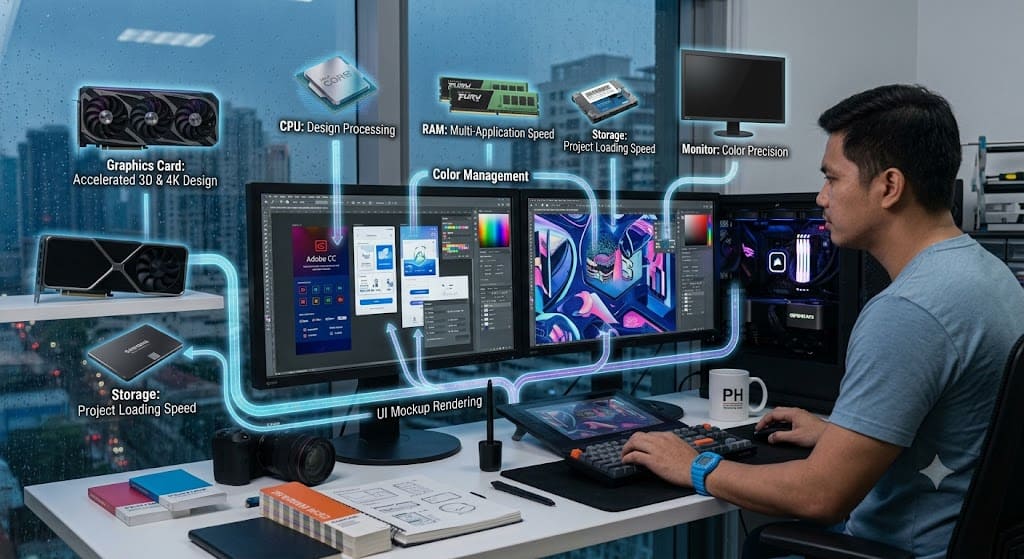
Before purchasing new hardware, identify where your current computer struggles. Every design workflow places different demands on a system. It is highly recommended that you focus on performance issues similar to slow application launches, delayed file saving, lag when zooming or panning large images, slow filter or effect processing, long export times, and reduced responsiveness while multitasking.
Using performance monitoring tools have the ability to tell whether the processor, graphics card, memory, or the storage is reaching max limits, like for instance:
- Large Photoshop projects often require substantial RAM.
- UI designers using browser-based tools may benefit more from a faster processor.
- Designers working with 3D graphics or motion graphics often depend more heavily on GPU performance.
- Slow storage devices frequently increase loading and saving times regardless of software.
Identifying the bottleneck prevents unnecessary upgrades and helps maximize your investment.
The Processor is the Foundation of Design Performance
The CPU remains one of the most important components in any design workstation. Many creative applications rely heavily on processor performance for calculations, exporting files, applying filters, and managing multiple tasks simultaneously.
Modern design software increasingly takes advantage of multiple CPU cores, although many editing tasks still depend heavily on strong single-core performance. If your current processor frequently reaches high utilization while working, upgrading the CPU can noticeably improve responsiveness across your entire workflow.
When considering a processor upgrade, remember to verify compatibility with your motherboard, cooling system, and BIOS version before purchasing.
Memory and Storage keep Projects Moving Smoothly
RAM and storage often provide some of the most noticeable performance improvements for designers.
RAM
System memory allows applications to keep active projects readily available without constantly reading data from storage. This is largely used by designers working with:
- Large PSD files
- High-resolution RAW photographs
- Multiple browser tabs
- Several Adobe applications simultaneously
Insufficient memory often causes:
- Sluggish multitasking
- Delayed switching between applications
- Slow previews
- Increased use of virtual memory
SSD Storage
Storage performance affects almost every aspect of daily work. Replacing an older hard drive with a modern SSD significantly improves:
- Boot times
- Application launches
- Project loading
- File saving
- Cache performance
NVMe SSDs offer even faster speeds than traditional SATA SSDs, particularly when handling large design assets.
For designers managing thousands of high-resolution files, fast storage reduces waiting time throughout the entire creative process.
When a Better Graphics Card makes a Difference?
Many people assume designers always need the most powerful graphics card available. In reality, GPU requirements depend on the type of creative work being performed. Graphic design applications increasingly use GPU acceleration for:
- Canvas navigation
- Zooming and panning
- Real-time previews
- AI-assisted editing tools
- GPU-accelerated filters
- High-resolution display support
However, some workflows benefit more than others. A stronger graphics card becomes particularly valuable for motion graphics, video editing, 3d modeling, architectural visualization, real-time rendering, and animation.
VRAM is another important consideration.
Higher-resolution images, multiple displays, and GPU-intensive applications consume additional graphics memory.
For traditional graphic design and UI/UX work, a balanced mid-range GPU is often sufficient. Designers working extensively with 3D content or GPU rendering should prioritize graphics performance and adequate VRAM.
Build a Balanced Workstation for Long-Term Productivity
The most effective design workstation is not built around a single high-end component. Instead, it balances processor performance, memory capacity, graphics capability, and storage speed.
A quality display with accurate color reproduction is essential for professional design work. Even the fastest computer cannot compensate for poor color accuracy when creating branding materials, digital artwork, or print-ready projects.
Reliable cooling helps maintain consistent performance during extended editing sessions, while a dependable power supply supports future upgrades safely. Planning for expandability is equally important. Choosing a motherboard with additional memory slots, storage connectors, and expansion options allows your workstation to grow alongside your professional needs.
A balanced system minimizes bottlenecks and provides consistent performance across a wide variety of creative applications.
The Right Hardware lets Creativity take Center Stage
Effective visual design depends on both creative skill and dependable technology. While software provides the tools for creating compelling graphics, illustrations, and interfaces, the hardware behind those applications determines how efficiently designers can bring ideas to life.
Rather than upgrading the newest or most expensive component, focus on the areas that directly affect your workflow. A faster processor improves responsiveness, additional RAM supports larger projects, SSD storage reduces waiting times, and an appropriately powerful graphics card accelerates demanding visual tasks.
Together, these upgrades create a balanced workstation that supports productivity without unnecessary expense.


